
Quick New Device
Quick New Device generates a brand-new device fingerprint and device information for a cloud phone, so it runs as a "fresh device". You can change the device model and choose to keep the proxy settings when executing. Both single and batch operations are supported. Each cloud phone receives 99 free refresh attempts per month; additional attempts can be paid for once the free quota is used up.
⚠️ Warning: Quick New Device clears all data on the cloud phone (installed apps, files, account login sessions, etc.). Make sure there is nothing to keep on the cloud phone and back up before executing. To simply restart the cloud phone (retaining data), see Reboot Cloud Phone.
1. Feature Overview
- Device renewal: generates a brand-new device fingerprint and device information;
- Data clearing: apps, files, and account login sessions on the cloud phone are cleared after execution;
- Model change: you can specify a new device model when executing, or keep the current one;
- Proxy retention: you can choose to keep the proxy settings currently configured on the cloud phone;
- Quota: 99 free refresh attempts are granted each month; extra attempts are paid per use, and the remaining attempts can be viewed in the cloud phone information.
2. Prerequisites
- A purchased cloud phone visible in the My Cloud Phones list;
- Quick New Device attempts not used up (paid execution is only available after the monthly free attempts are used up);
- Data on the cloud phone has been backed up (all data will be cleared after execution).
3. Steps
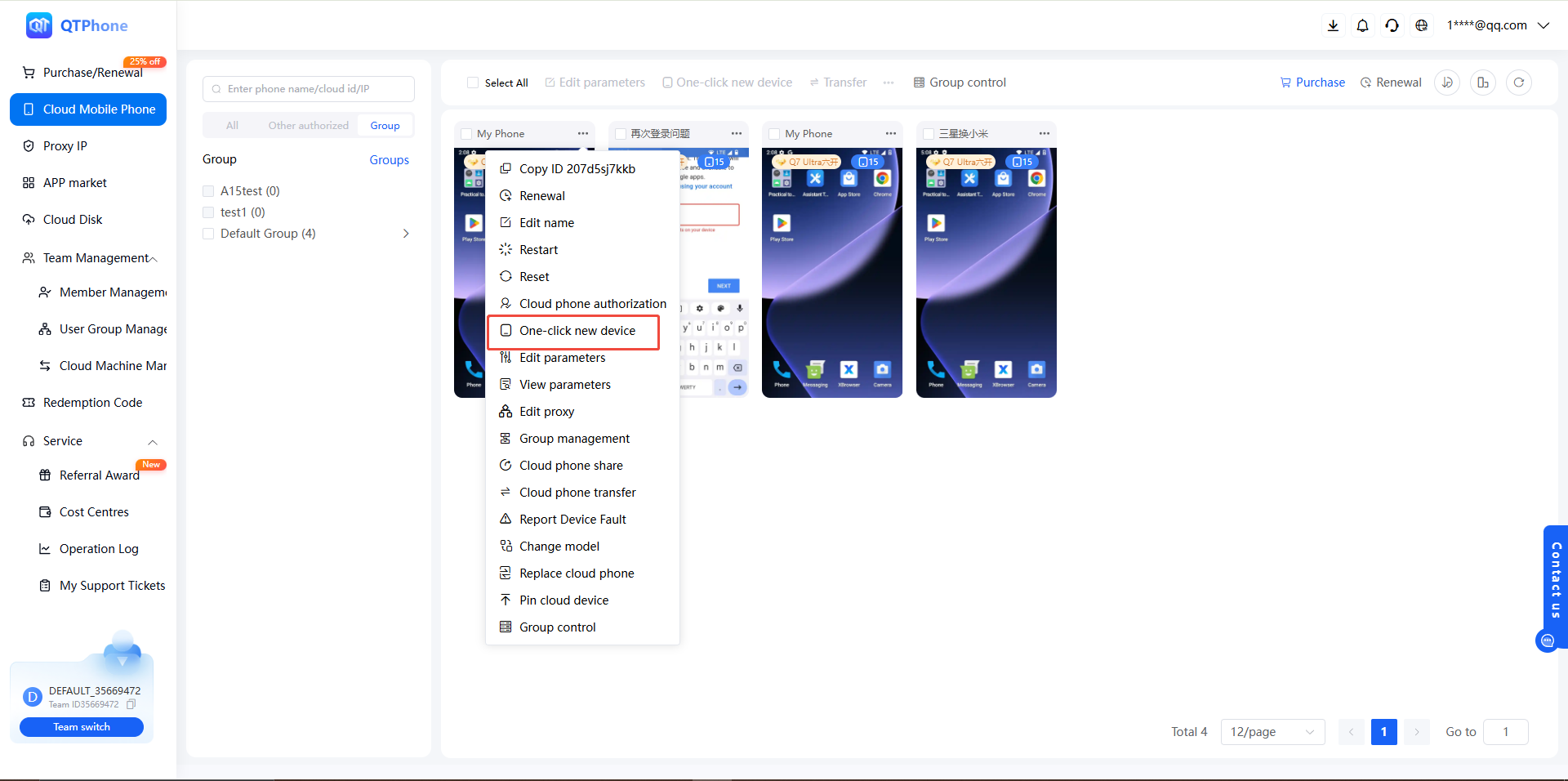
1. Quick New Device for a Single Cloud Phone
- Go to the My Cloud Phones list;
- Find the target cloud phone and click Quick New Device in the cloud phone operations;
- In the dialog, select a device model (you can keep the current one);
- Choose whether to keep the proxy settings;
- Confirm and wait for the renewal to complete.
2. Batch Quick New Device
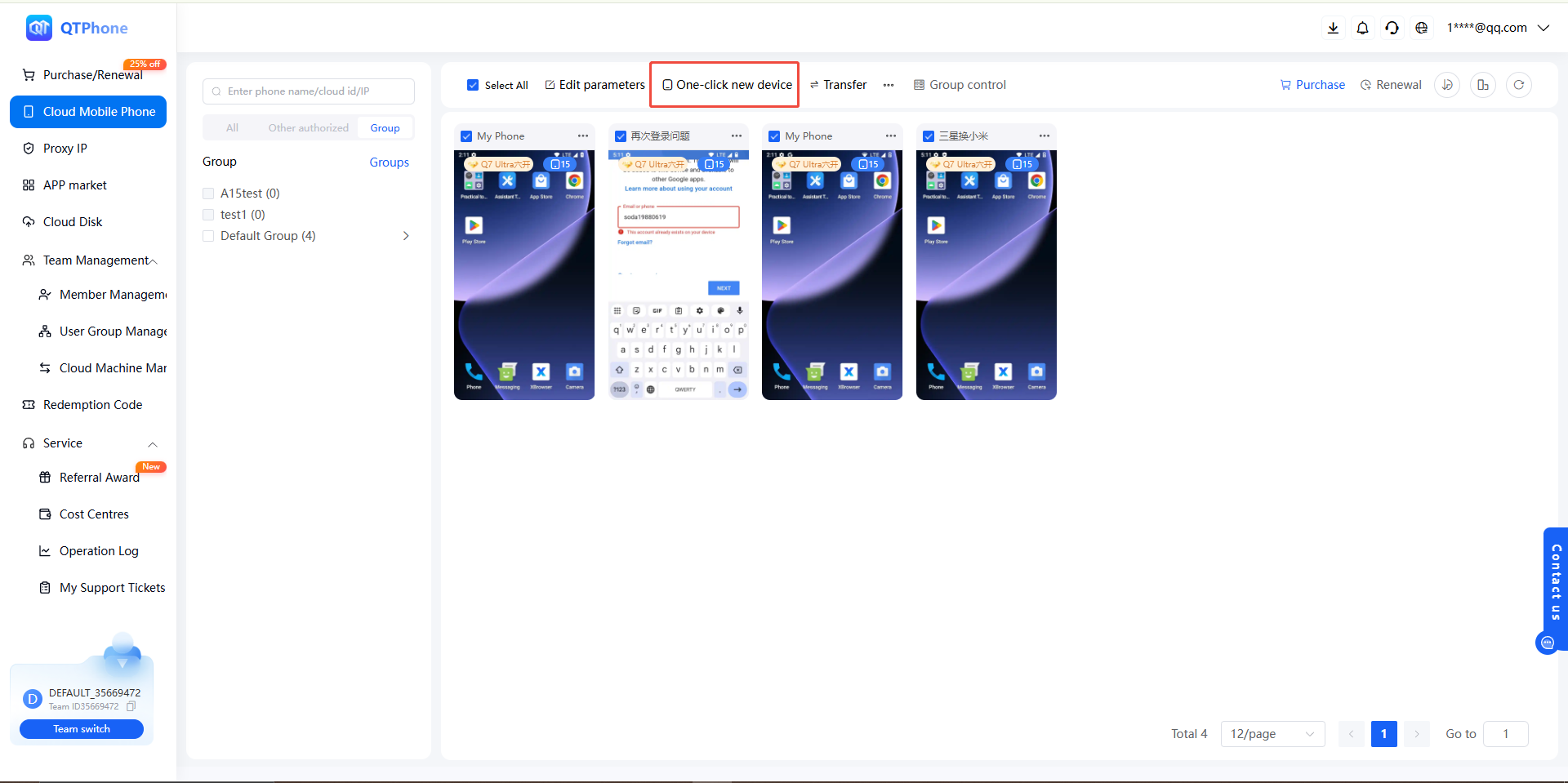
- In the My Cloud Phones list, check the cloud phones to renew;
- Click Quick New Device to renew the selected cloud phones;
- Select the device model and whether to keep the proxy settings, confirm the number, and execute; the selected cloud phones will be renewed one by one.
4. Notes
- Quick New Device clears all data on the cloud phone; back up important data in advance (for example, by downloading it out of the cloud phone);
- Each cloud phone receives 99 free refresh attempts per month; extra attempts are paid per use;
- For cloud phones with a proxy configured, check keep the proxy settings to continue using the current proxy; otherwise you must reconfigure the proxy after renewal — see Set Cloud Phone Proxy;
- The cloud phone is temporarily unavailable during the renewal; do not perform other operations at the same time;
- Each cloud phone comes with 99 refresh attempts per month, shared with the change-device-model and replace-cloud-phone features.
5. FAQ
Q1: Does Quick New Device clear data? Yes. All data on the cloud phone (installed apps, files, account login sessions, etc.) will be cleared; back up before executing.
Q2: What is the difference between Quick New Device and resetting a cloud phone? Both clear the data on the cloud phone. Resetting restores factory settings (see Reset Cloud Phone); Quick New Device also generates a brand-new device fingerprint for the cloud phone, allows changing the device model, and lets you choose whether to keep the proxy settings.
Q3: Where can I view the free attempts? The free attempts, paid attempts, and total monthly free attempts for Quick New Device can be viewed in the cloud phone information.
Q4: Can I change only the device model? Yes. Simply select the target model when executing Quick New Device; each cloud phone comes with 99 refresh attempts per month that can be used to change the model.
Q5: Is the proxy retained after Quick New Device? If you check "keep the proxy settings" when executing, the proxy configuration is retained; otherwise you need to reconfigure it — see Set Cloud Phone Proxy.
Q6: How do developers perform Quick New Device via the API? Use the Quick New Device API, which supports batch execution with a specified model (modelSid) and proxy retention (keepProxy).